As the lead designer, my goal was to create a unified and recognizable interactive style for our suite of thought leadership landing pages by establishing the visual brand guidelines and determining the creative direction for an engaging user experience across both new and refreshed existing pages. This thought leadership topic highlights how inflation disproportionately impacts Americans of color, offering organizations valuable consumer insights.
The value of using typography, color, and whitespace intentionally to create visual hierarchy and to structure complex information. This improved comprehension and scannability.
While C-level executives insights provide valuable input, it's equally vital to complement this with feedback from a diverse array of site users, ensuring a more holistic understanding of our audience's preferences and needs.
How wireframing and prototyping can quickly test ideas and get stakeholder feedback prior to high-fidelity work. This allowed improving and refining the design efficiently.
Existing thought leadership landing pages and brand were not portraying value
Ipsos faced heavy text-based content pages that made it tough for users to quickly scan information. There was little visual hierarchy and information structure, which did not inspire users to uncover insights Ipsos has to offer.
Identifying key takeaways was challenging without visual cues like icons, diagrams or color coded sections to highlight important insights. Repetitive page layouts led to lack of variation and failed to orient users as they consumed the research findings.
Key issues
Dense, keyword-stuffed copy that didn’t resonate
Responsiveness isn’t always considered
Data points are
not communicated visually
Lack of thoughtful
information architecture
Previous design vs revamp version
Old
New
Who are we talking to?
General public interested in economic issues, especially racial disparities
Advocacy groups/non-profits focused on economic justice
Users may be frustrated by the overwhelming amount of text and may feel like they're sifting through irrelevant information
Users might need a more user-friendly and visually engaging way to consume complex research findings quickly and effectively.
Enhancing clarity through responsiveness, interactions, data visuals, layout, imagery, and text
Optimize web application: elevate user experience on mobile and desktop
Provide a user-friendly experience: make it easy for users to understand what Ipsos offers and how to take action
Re-design a landing page that effectively communicates the brand
Design thinking method in mind
01
Competitive analysis
of similar landing pages was performed to explore effective styles and UX approaches. Competitive research was conducted by benchmarking 5-6 leading landing pages in this content domain. Common strengths identified included prominent data visualizations, strong information hierarchy, and bold colors for engagement.
02
Wireframing
Initial black and white wireframes
were created focused on content structure and flow. Multiple directions were explored and iterated on.
03
Stakeholder Review
Selected wireframes were shared internally and provided to the CMO and Art Director for feedback to align on preferred information architecture.
04
Visual Design
The approved wireframe direction was refined visually applying brand colors, typography, and graphics.
05
Interactive Prototype
Wireframes were converted into a clickable prototype for internal testing.
06
Iteration
The prototype was refined based on feedback from the CMO and Art Director.
07
Final Design
Visually polished, responsive high fidelity pages were delivered with all elements finalized.
Initial design phase
Mobile
Desktop
Mobile
Desktop
Content layout and hierarchy to streamline the user path
High-level key takeaway information is captured first. From there, content narrows into more detailed criteria that ranges from one to three sections.
Visually refined landing pages
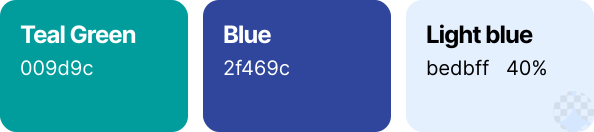
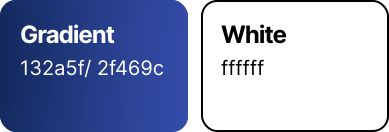
Color
Primary
Applied frequently to highlight actions & information
Secondary
Applied to highlight data in charts
Background
Applied to Key Takeaways, Core Criteria 2, and a possible Core Criteria 3 sections, full width background
Content
Applied to heading and body
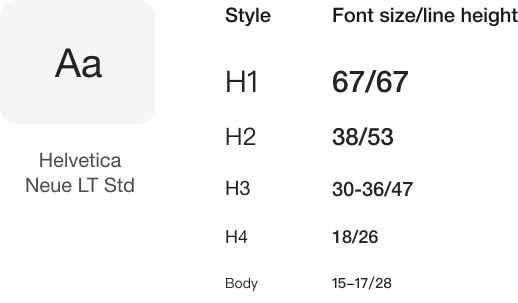
Typography
Font Family
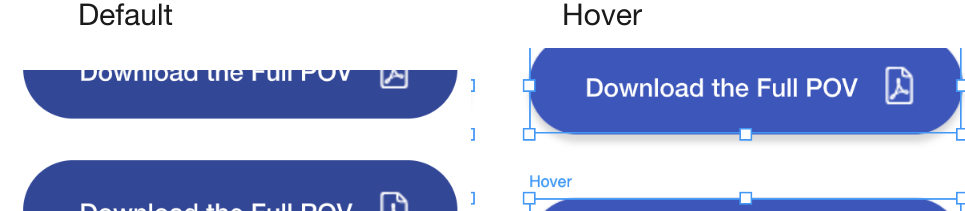
Button
Button indicates the main action. There is one primary button
Space
Icons
Scale
55–62px, Stroke 70, .gif 800px, Infinite loop
Primary colors .gif icons
2f469c/Blue, 009d9c/Teal
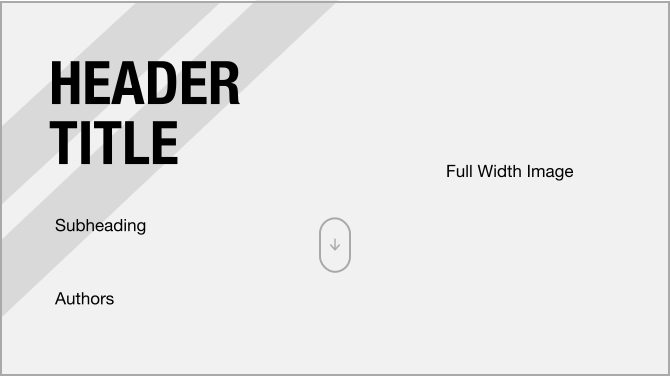
Header
Header image set to full width by default and imagery is determined by other teams
Stripes and full width image must fall behind the header title for brand consistency
The value of using typography, color, and whitespace intentionally to create visual hierarchy and structure complex information. This improved comprehension and scannability.
While C-level executives insights provide valuable input, it's equally vital to complement this with feedback from a diverse array of site users, ensuring a more holistic understanding of our audience's preferences and needs.
How wireframing and prototyping can quickly test ideas and get stakeholder feedback prior to high-fidelity work. This allowed improving and refining the design efficiently.
 Cheyene - Sr. Digital Designer